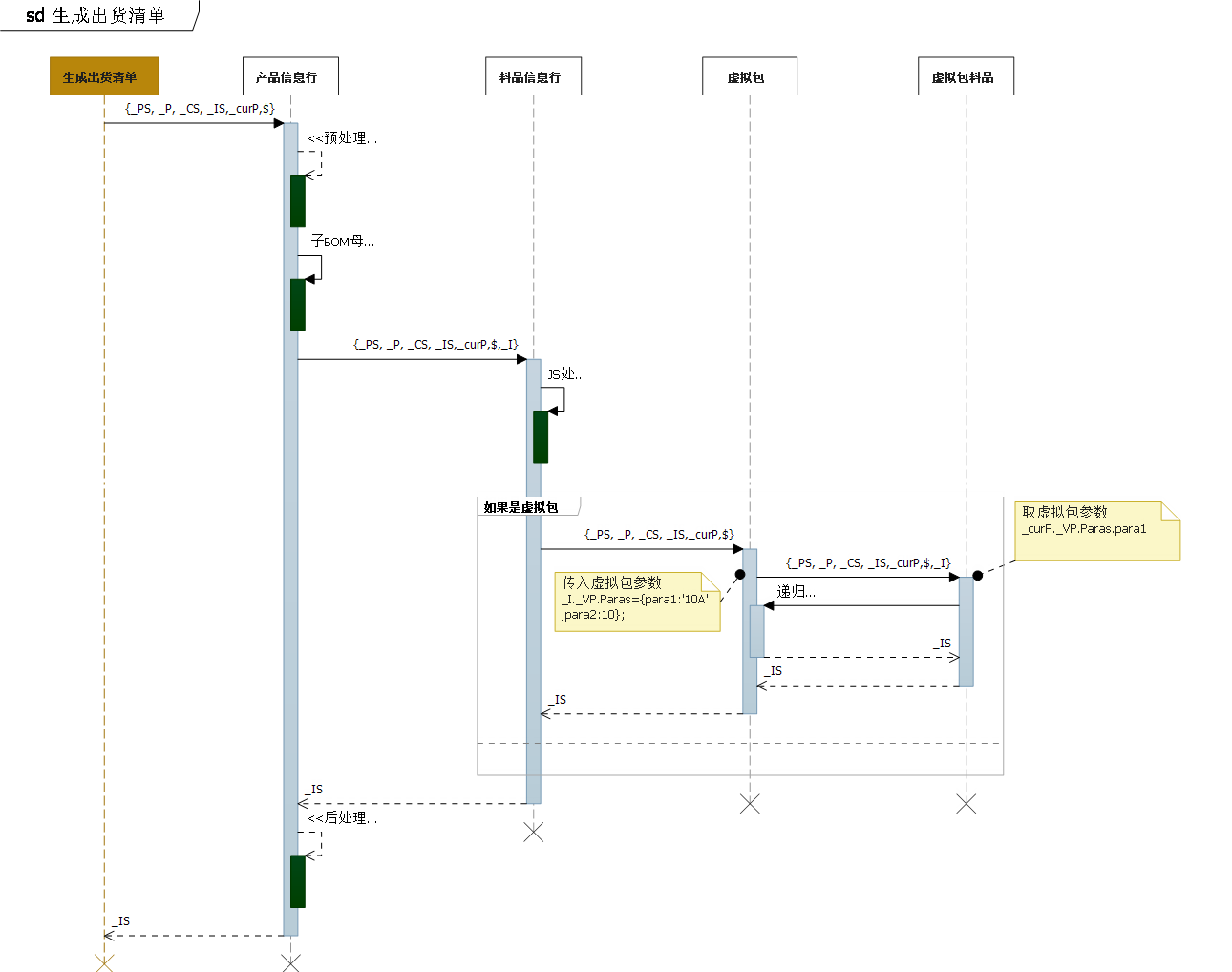
一、说明:采用nodejs开发,主要目的是提升运算性能、增强配置功能,简化配置。
二、语法:标准的js语法,区分大小写,支持自定义变量、自定义函数。
三、上下文:
1)当前产品信息行_P,_P类型为pClass。产品配置生成出货清单时是按着工程配置产品信息行一行行的运算分解的。
function pClass(){
    this.ID = -1;
    this.GroupSymbol='';
    this.Item=-1;
    this.ItemCode='';
    this.ItemMasterFate=-1;
    this.ItemName='';
    this.ProductInfo = -1;
    this.ProductCode='';
    this.ProductName='';
    this.Qty=0;
    this.Spec='';
    this.WH=-1;
    this.WHCode='';
    this.WHName='';
    this.ConfigModel= '';
    this.ConfigType = -1;
    this.ChildBomMaster = -1; //子BOM母件的ID
    this.ChildBomWHCode = '';//对应子BOM母件的存储地点
    this.ChildBomTransfer = false; //对应子BOM母件是否调拨
    this.Info = { Usage: { Value: -1 } };//0是备品,1是工程
    this.CS = [];
} 当前产品_curP,_curP类型为pClass, _curP与_P的区别是_curP在多级虚拟包中,指的是虚拟包本身。
2)所有产品信息行_PS:
{
  Items:[] //pClass数组
  ,Count:function(){ }
  ,Sum:function(){ }
  ,IsExists:function(){ }
  ,Find:function(filter,sort){ }
 }
3)当前产品所有参数_CS:
类型cClass定义如下:
function cClass(){
    this.Code='';
    this.Name='';
    this.Value='';
    this.ValueName='';
}
_CS定义如下:
{
  Items:[] //cClass数组
  ,Count:function(){ }
  ,Sum:function(){ }
  ,IsExists:function(){ }
  ,Find:function(filter,sort){ }
 }
4)全局参数调用$:
获取全局参数,产品参数,产品数量的函数。
      $('G.XSQY')              //全局参数:返回字符串或字符串数组,如 'a'或['JOYO-YS','JOYO-B44']
      $('P.UT-0362.I/0KR')     //产品参数:按参数类型返回值,可以是字符串、布尔、数字中的一种。
      $('C.MNP_AJQ.AJQ4')      //产品数量:返回数量
5)当前料品_I,对应于工程配置料品信息行。
{
    this.Item = -1;
    this.ItemCode = '';
    this.ItemName = '';
    this.Qty = 0;//数量
    this.WH = '';//存储地点编码
    this.Transfer = false;//调拨
    this.ID = -1;//产品配置料品信息行ID
    this.Key = -1;//唯一ID
    this.ProjectProductInfoID = -1;
    this.ItemMasterInfo = -1;
    this.ProductInfoRowno = -1;
    this.IsPublic = false;
    this.IsSecond = false;
}
6)当前运算结果:_IS,运算过程中,数量大于零的料品信息行被添加到全集合。_IS.Item指的是所有运算结果,_IS.CurItems指的是当前产品信息行的结果。
function isClass() {
    this.CurProductInfoID = -1;
    this.curKeyIndex = 0;
    this.Items = [];
    this.CurItems = [];
    this.Add = function (item) {};
    this.Remove = function (item) {};
    this.ResetCurItems = function () {};

}
注意:没有特别情况下,请不要修改该集合,会影响运算结果。
7)虚拟包参数:_VP
8)产品运算前预处理:
9)产品运算后处理:
四、功能:
1)虚拟包传参:
在料品表达式中设置参数
_I._VP.Paras={para1:'10A',para2:10}; 在虚拟包中调用参数
var p1 = _curP._VP.Paras.para1;
建议在虚拟包的产品预处理表达式初始化参数:
  _curP._VP.Paras = applyIf(_curP._VP.Paras,{
       para1:'20A' /*默认值10A*/
       ,para2:10   /*默认值10*/
       ,para3:8
  });
五、兼容性预置函数:
字符串是否在参数内。参数可以是字符串,也可以是字符串数组,返回布尔值。
 console.log( 'a'.in('a','b') );  //true
 console.log( 'a'.in(['a','c'], 'b') );  //true
console.log( 'a'.in(['d','c'], 'b') ); //falseconsole.log( 'abc'.like('a') ); //false
console.log( 'abc'.like('%a%') ); //true
console.log( 'abc'.like('%h%') ); //false
console.log( 'abc'.like('%a') ); //false
console.log( 'abc'.like('%bc') ); //true
console.log( 'abc'.like('bc%') ); //false
console.log( 'abc'.like('%bc%') ); //true
     var num = 1;
     console.log(num.in(1, 3, 4) ); //true
     console.log(num.in([1, 3], 4) ); //true
     console.log(num.in([2, 3], 1) );  //true
     console.log(num.in([2, 3], 4)  ); //false
注意:不能直接写4.in(1,4) ,否则会报语法错误。
六、生成出货清单计算过程: